What is RAG (Retrieval-Augmented Generation)? A Beginner's Guide
Large Language Models are trained on huge amounts of public data: books, websites, forums. That is also their limit. Because they only know what was in that training data, they are good at general questions and weak at anything specific to your company or product.
Here is the simple version of the problem. If you ask an LLM, “In which year did Sri Lanka gain independence?”, it will almost certainly answer 1948, because that fact is everywhere online. But ask it something that only exists inside your own company, and it will either guess wrong or tell you it does not know.
There is a second limit. LLMs are not updated in real time. If a model was trained on data up to the end of 2023, it knows nothing about 2024 or later.
This is where Retrieval-Augmented Generation (RAG) comes in. RAG pairs the LLM with a retrieval system that fetches relevant information from your own private, custom, or real-time data. Think of it as a smart assistant that searches through your internal documents and uses what it finds to answer accurately, without retraining the model.
Before I show you the workflow, there is one building block you need to understand first.
Embedding models
An embedding model is a machine learning model that turns text (words, sentences, whole documents) into vectors, which are just series of numbers. Those numbers capture the meaning of the text in a way a computer can work with. Text with similar meaning ends up with vectors that sit close together in the vector space.
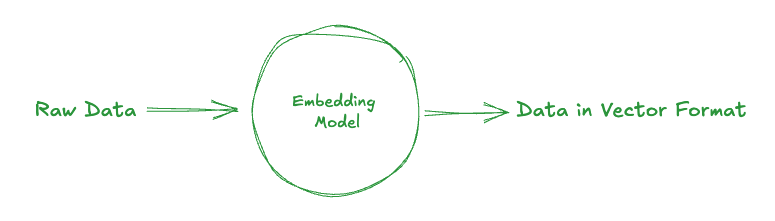
Computers do not understand language the way we do, so the embedding model translates words into numbers based on their context and usage. A quick example:
- “buy coffee” and “get espresso” mean roughly the same thing, so their vectors sit close to each other.
- “buy coffee” and “watch a movie” mean different things, so their vectors sit far apart.
This is what lets a machine measure how similar two pieces of text are by meaning, even when they use completely different words.
How RAG works
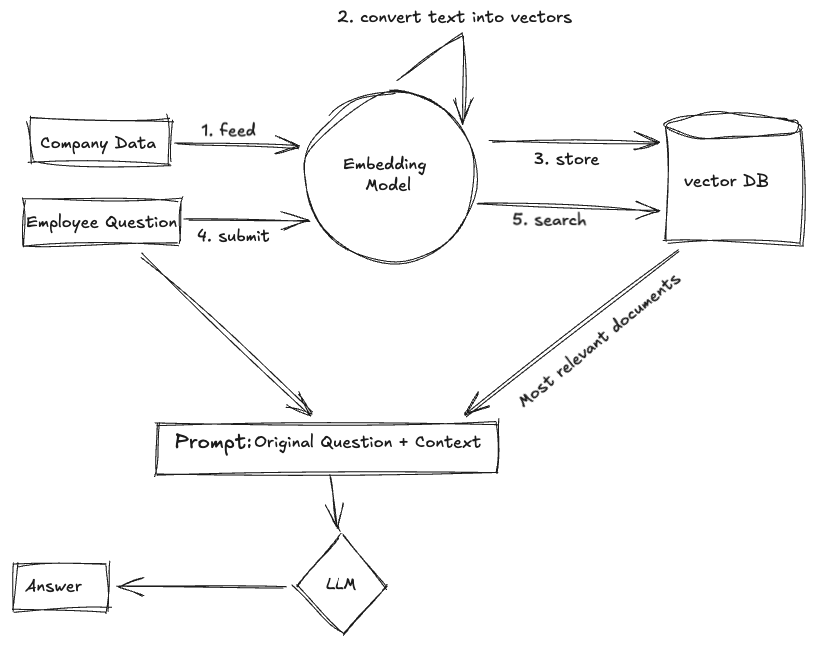
Here is the flow, step by step.
| Step | What happens |
|---|---|
| Feed company data | Your internal documents or knowledge bases are fed into the embedding model. |
| Convert to vectors | The embedding model converts the data into numeric vectors that capture meaning. |
| Store in a vector DB | The vectors are stored in a vector database for fast searching. |
| Submit a question | A user asks a question, which is also converted into a vector. |
| Search for context | The system searches the vector DB for documents that are similar in meaning. |
| Combine with the question | The retrieved documents (the context) are added to the original question. |
| LLM generates the answer | The combined prompt goes to the LLM, which generates a context-aware answer. |
Why use RAG
RAG has real advantages over a standalone LLM. Because it pulls in real-time, private, or domain-specific data, it produces answers that are more accurate, more relevant, and more up to date, without the cost and effort of fine-tuning a model. It also improves data privacy, reduces hallucinations, and lets you stay agile as your knowledge base grows and changes.
A real use case
One of the most useful things you can build with RAG is an internal tool that answers employee questions from private, company-specific knowledge that is not available online.
Here is an example from my own world. Imagine your engineering or QA team has built an internal test automation framework. It has its own unique syntax and structure, and you have written a proper knowledge base of documentation and examples. None of those custom scripts or their troubleshooting steps exist on Google or Stack Overflow.
This is exactly where RAG shines. Instead of digging through long internal docs or messaging a colleague, an engineer just asks:
“How do I assert multiple strings in an API response?”
The RAG system then:
- Converts the question into a vector
- Retrieves the most relevant internal docs or script examples
- Combines that context with the original question
- Passes it to the LLM to generate an accurate, context-aware answer
That reduces how much everyone depends on the one person who knows everything, speeds up debugging, and turns your internal documentation into an intelligent support system.
Why do we still need the LLM?
You might ask a fair question. If the vector database already finds the most relevant documents, why not just show those to the user?
The answer is simple: retrieval is not understanding.
A vector database is excellent at finding information, but it cannot:
- Summarise, rephrase, or interpret that information
- Understand the user’s intent in natural language
- Combine several sources into one clear answer
That is the LLM’s job. Once the relevant documents are retrieved, the LLM acts as the brain. It reads the context, understands the question, and generates a human-like answer, so the user does not have to wade through raw documents.
Data, privacy, and missing answers
Three questions come up almost every time I explain this.
Do we pass vectors to the LLM? No. The LLM never sees vectors. Vectors are only used during the search step inside the vector database. Once the most relevant documents are found, the system takes their original text and combines it with the user’s question to build a plain-text prompt. That prompt is what goes to the LLM.
Is my private data safe? It can be, with the right setup. For example, services like the OpenAI API (not the ChatGPT UI) do not use your data to train their models by default. For stronger privacy, many organisations either use the OpenAI API, Azure OpenAI, or AWS Bedrock with enterprise guarantees, or run open-source LLMs locally so the data never leaves their own environment. Always read the provider’s data-usage policy, and never send sensitive data to a tool that stores prompts for training.
What if the answer is not in the vector database? The system will still retrieve the closest matching documents by meaning. But if none of them are actually relevant, the LLM may produce a generic or inaccurate answer, or fail to answer at all. This is the hallucination risk: the model answering without enough reliable context. To handle it:
- Keep your knowledge base comprehensive and updated
- Add fallback messaging, such as “Sorry, I could not find enough information to answer that right now.”
- Log unanswered queries so you can improve the database over time
Where to go next
RAG is not just a buzzword. It is a practical fix for a real problem: making LLMs useful when the data is private, dynamic, or domain-specific. Instead of retraining models or leaning on general knowledge, you build systems that search, understand, and respond using your own data in real time.
Once you have built one, the next question is how good it actually is. That takes a different way of thinking, which I cover in why testing LLMs requires a mindset shift. From there, context precision and context recall explain how to measure retrieval quality, and setting up RAGAS walks you through running your first evaluation test in Python.
That’s it for today, guys. Thank You for Reading! I hope you found this article informative and useful.
If you think it could benefit others, please share it on your social media networks with friends and family who might also appreciate it.